


UTM parameters not passing through forms is one of the most common attribution problems in B2B marketing.
You set up your campaigns correctly. You tag your URLs. But when leads come through, the source data is blank.
This article explains why it happens, and how to fix it permanently.
Why Your Form Submissions Are Missing UTM Data
UTM parameters only exist in one place: the URL.
The moment a visitor navigates away from the page they landed on, those parameters are gone.
Most marketers assume their forms are capturing source data on every submission. In practice, they are only capturing it when a visitor lands and converts on the exact same page, in the same session, without clicking anywhere else first. That is a fraction of your actual leads.
Here is where the data disappears.
The multi-page navigation problem
A visitor clicks your Google Ad and lands on your homepage.
The URL contains your UTMs. Everything looks correct.
Then they click to your pricing page. Or your case studies. Or your about page.
The UTMs are no longer in the URL.
When they eventually fill out your form, the form reads the current URL and finds nothing. The lead is recorded in your CRM with no source, no campaign, no channel.
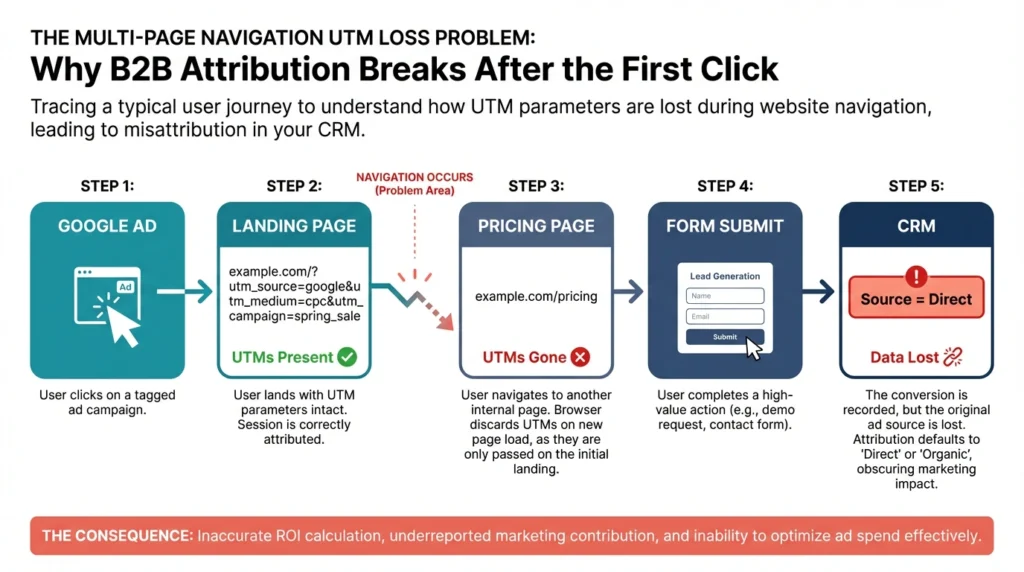
This is not an edge case. It is the default behavior of every form builder on the market. A form can only capture what is in the URL at the moment of submission. Practitioners across HubSpot, Marketo, and Typeform communities report the same issue: UTMs work on direct landing page submissions and break the moment a visitor browses before converting.
The subdomain problem
Many B2B websites split their stack across domains.
Main site on one domain. Landing pages, booking pages, or forms hosted on a subdomain.
A visitor lands on your main domain with UTMs in the URL, clicks through to a form hosted on a subdomain, and submits.
Your CRM records the lead as direct traffic.
UTM parameters do not transfer across domains or subdomains automatically. Without explicit configuration, every lead generated through a subdomain form loses its attribution at the domain boundary.
The redirect and iFrame problem
301 redirects are an attribution killer.
If your campaign URLs redirect through multiple hops before reaching the landing page, most server configurations strip query strings along the way. Your UTMs never arrive.
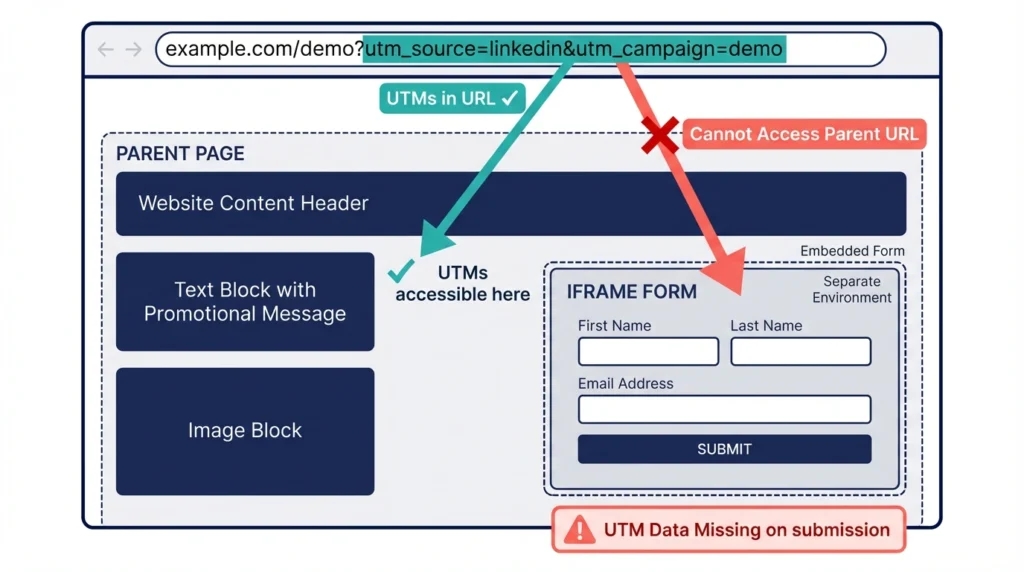
iFrame-embedded forms create a separate problem. An iFrame operates independently from the parent page and cannot access the URL of the page it sits on. Without custom JavaScript passing the parameters manually into the iFrame, your form has no way to read them.
WordPress sites compound this further. Security plugins and caching tools routinely strip unfamiliar query parameters by default, often without any visible warning that tracking has broken.
How to Fix UTM Parameters Not Passing Through Forms
There is no single universal fix. The right solution depends on where your UTM data is breaking: during multi-page navigation, across subdomains, or at the redirect and iFrame level.
What follows are three solutions, each addressing a specific failure point.
Solution 1: Fix UTM loss during multi-page navigation
The core fix is to stop relying on the URL and start storing UTM data independently.
When a visitor lands on your site, a JavaScript snippet reads the UTM parameters from the URL and writes them to a first-party cookie. That cookie persists as the visitor navigates between pages. When they eventually submit a form, hidden fields read the cookie and populate the UTM values automatically.
The form no longer needs to see the UTMs in the URL.
It reads them from the cookie instead.
The source data survives the entire browsing session.
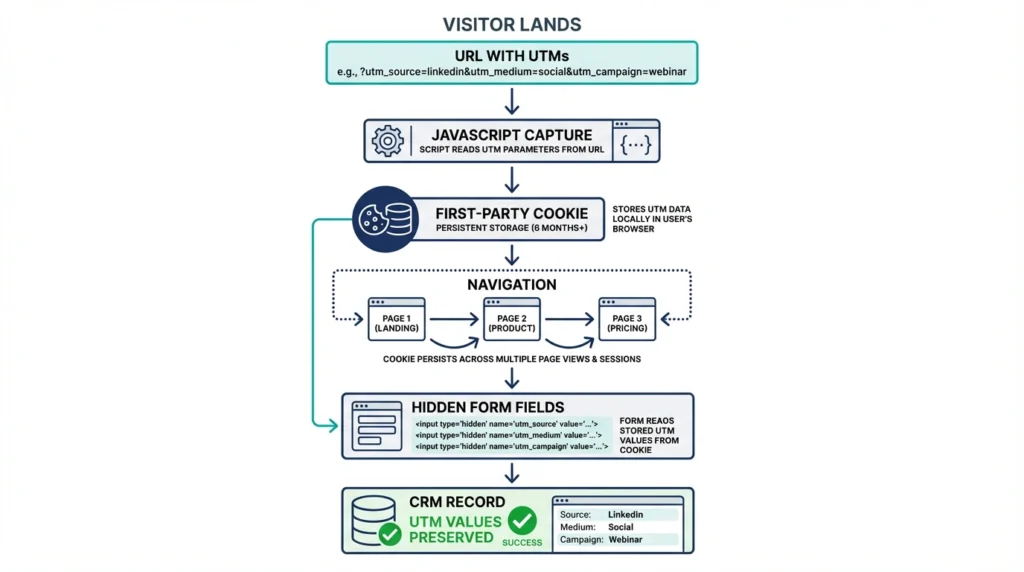
This requires a developer to implement correctly, or a properly configured Google Tag Manager setup. The cookie logic also needs to be built for first-touch attribution specifically, otherwise it will overwrite the original UTM values each time the visitor loads a new page.
LeadSources handles this automatically. UTM parameters are captured on the first visit and held across every subsequent page, regardless of how many pages the visitor browses before submitting a form. No custom code required.
Solution 2: Fix UTM loss across subdomains
The fix here is cross-subdomain tracking: configuring your tracking setup to treat your main domain and subdomain as a single continuous session.
In practice, this means storing UTM data at the point of first contact on the main domain and making it accessible when the visitor moves to the subdomain. The most reliable method is a shared cookie configuration, where the cookie is set on the root domain so it is readable by all subdomains.
Done correctly, a visitor who lands on your main site and converts on a form hosted on a subdomain will have their original UTM data intact on submission.
Done incorrectly, and every lead generated through a subdomain form arrives in your CRM as direct traffic with no source attached.
This configuration requires careful implementation and testing across your specific domain and subdomain setup. GA4 cross-domain tracking can preserve session continuity inside Google Analytics, but it does not automatically push UTM data into your form hidden fields or CRM.
LeadSources tracks UTM parameters from your main domain to your subdomain natively. No GTM configuration, no custom cookie logic, no developer work needed.
Solution 3: Fix UTM loss from iFrame-embedded forms
When a form is embedded via iFrame, it operates independently from the parent page and cannot read the URL it is hosted on. UTM parameters sitting in the parent page URL are invisible to the form. The lead submits, and no source data is captured.
The technical fix requires JavaScript on the parent page that reads UTM parameters and passes them explicitly into the iFrame before it loads. It is non-trivial and needs to be implemented separately for each form.
Most form builders do not handle this natively, which is why it breaks silently and often goes unnoticed for weeks.
LeadSources integrates with all major form builders and resolves this automatically. UTM parameters captured on the parent page are passed through to the form at submission, with no custom JavaScript and no per-form developer work needed.
Stop Losing UTM Data on Every Form Submission
UTM parameters that disappear during navigation, across subdomains, or inside iFrames are not a minor inconvenience. They are attribution gaps that silently distort your budget decisions.
The fix exists. And it does not require a developer.
Book a 20-minute strategy call to see how LeadSources captures and holds UTM data from first click to form submission, across every page, every subdomain, and every form builder you use.